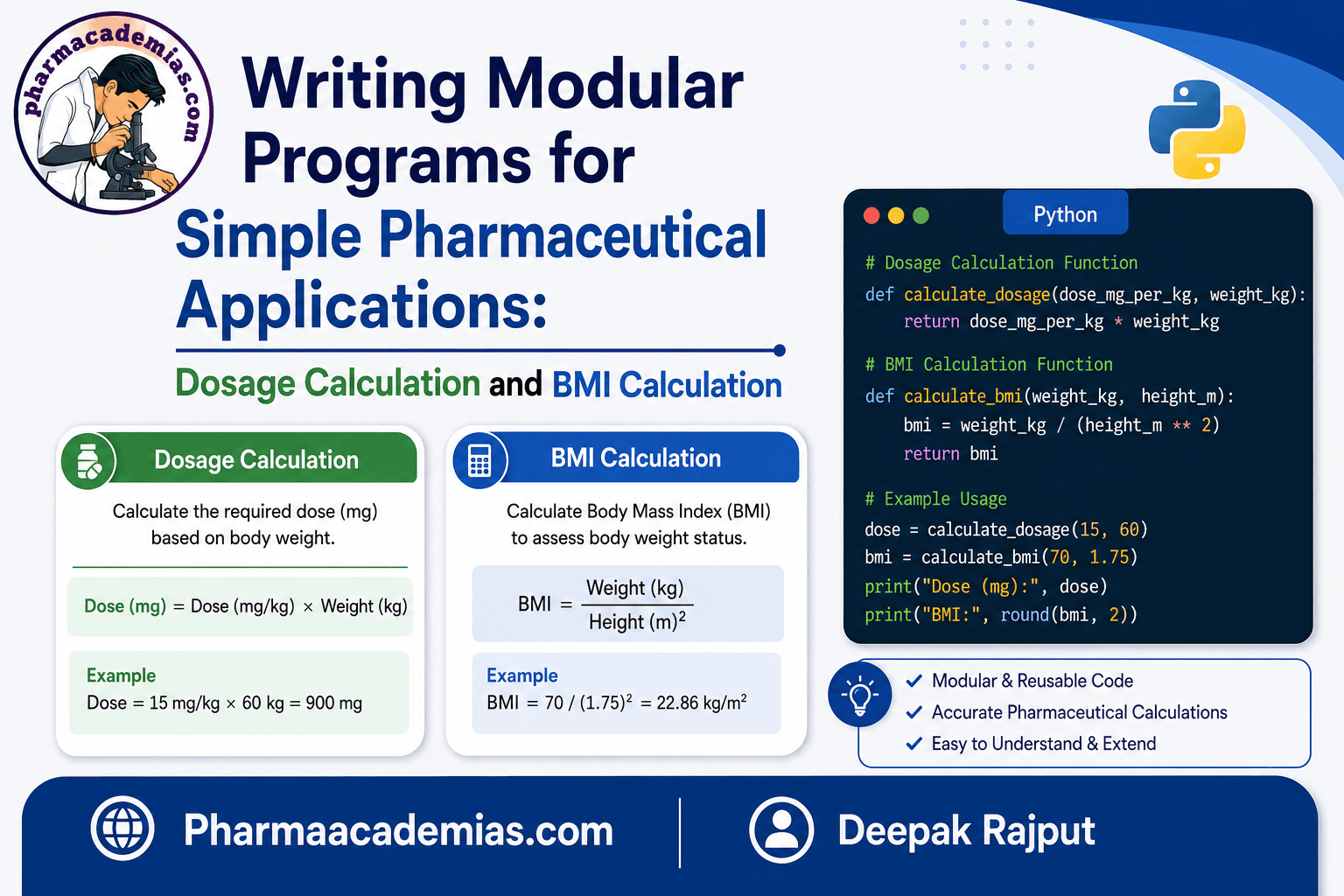
Defining and Calling Functions: Functions are one of the most important concepts in Python programming. A function is a reusable block of code designed to perform a particular task. Instead of writing the same code repeatedly, we can define it once inside a function and call it whenever required.
For pharmacy students, functions are particularly useful for performing repeated calculations such as dose calculation, drug concentration, dilution, percentage yield, BMI calculation, statistical calculations, and laboratory data analysis.
1. What is a Function?
A function is a named block of statements that performs a specific operation.
For example:
def greet():
print(“Welcome to Python programming”)
In this example:
- def is a keyword used to define a function.
- greet is the name of the function.
- () contains parameters, if required.
- The indented statements form the function body.
Defining a function only creates the function. The code inside it executes when the function is called.
2. Defining a Function
A function is defined using the def keyword.
General Syntax
def function_name(parameters):
statements
For example:
def welcome():
print(“Welcome Pharmacy Students”)
The function above is named welcome.
When Python reads this code, it creates the function but does not execute the print() statement immediately.
3. Calling a Function
To execute a function, we need to call it.
def welcome():
print(“Welcome Pharmacy Students”)
welcome()
Output
Welcome Pharmacy Students
Here, welcome() is the function call.
A function can be called multiple times.
def welcome():
print(“Welcome Pharmacy Students”)
welcome()
welcome()
welcome()
Output
Welcome Pharmacy Students
Welcome Pharmacy Students
Welcome Pharmacy Students
This demonstrates one of the major advantages of functions: code reusability.
4. Passing Arguments to a Function
An argument is a value supplied to a function when the function is called.
For example:
def greet(name):
print(“Hello”, name)
greet(“Rahul”)
Output
Hello Rahul
Here:
- name is the parameter.
- “Rahul” is the argument.
Parameter vs Argument
| Term | Meaning |
| Parameter | Variable written in the function definition |
| Argument | Actual value supplied when calling the function |
For example:
def square(number): # number = parameter
print(number * number)
square(5) # 5 = argument
5. Passing Multiple Arguments
A function can accept multiple arguments.
def add(a, b):
print(“Sum =”, a + b)
add(10, 20)
Output
Sum = 30
Here, a and b are parameters, while 10 and 20 are arguments.
Another example:
def student_details(name, course, year):
print(“Name:”, name)
print(“Course:”, course)
print(“Year:”, year)
student_details(“Rahul”, “B.Pharm”, 3)
Output
Name: Rahul
Course: B.Pharm
Year: 3
6. Positional Arguments
In positional arguments, values are assigned to parameters according to their position.
def patient_info(name, age):
print(“Name:”, name)
print(“Age:”, age)
patient_info(“Amit”, 25)
Here:
- “Amit” is assigned to name.
- 25 is assigned to age.
The order is important.
patient_info(25, “Amit”)
This would assign 25 to name and “Amit” to age, which is not the intended use.
7. Keyword Arguments
In keyword arguments, we explicitly specify the parameter name.
def patient_info(name, age):
print(“Name:”, name)
print(“Age:”, age)
patient_info(age=25, name=”Amit”)
Output
Name: Amit
Age: 25
The advantage of keyword arguments is that the order does not have to match the order of parameters.
8. Default Arguments
A function can have a default value for a parameter.
def greet(name=”Student”):
print(“Hello”, name)
greet()
Output
Hello Student
If an argument is supplied, it replaces the default value.
greet(“Deepak”)
Output
Hello Deepak
Default arguments are useful when a parameter commonly has the same value.
9. Returning Values from a Function
A function can return a value to the program using the return statement.
Example
def add(a, b):
return a + b
result = add(10, 20)
print(“Result =”, result)
Output
Result = 30
The function calculates 10 + 20 and returns 30. The returned value is stored in the variable result.
10. Difference Between print() and return
This is an important concept for beginners.
Using print()
def add(a, b):
print(a + b)
add(10, 20)
The function displays the result but does not return it for further use.
Using return
def add(a, b):
return a + b
result = add(10, 20)
print(result)
The function returns the result, allowing it to be stored, reused, or used in another calculation.
In simple terms:
- print() → displays a value.
- return → sends a value back from the function.
11. Returning Multiple Values
Python allows a function to return more than one value.
def calculate(a, b):
addition = a + b
multiplication = a * b
return addition, multiplication
sum_result, product_result = calculate(5, 4)
print(“Sum:”, sum_result)
print(“Product:”, product_result)
Output
Sum: 9
Product: 20
This can be useful when a calculation produces several related results.
12. Pharmaceutical Example: Dose Calculation
Functions are very useful for pharmaceutical calculations.
Suppose a calculation requires multiplying body weight by a specified dose value.
def calculate_dose(weight, dose_per_kg):
dose = weight * dose_per_kg
return dose
weight = 60
dose_per_kg = 5
result = calculate_dose(weight, dose_per_kg)
print(“Calculated dose:”, result, “mg”)
Output
Calculated dose: 300 mg
Explanation
The function receives:
- weight = 60 kg
- dose_per_kg = 5 mg/kg
It calculates:
Dose = Weight × Dose per kg
Dose = 60 × 5 = 300 mg
Note: This is a programming example for educational purposes. Actual medication dosing must be determined using the appropriate clinical guidance, product information, and qualified healthcare-professional judgment.
13. Pharmaceutical Example: Percentage Yield
Percentage yield can also be calculated using a function.
def percentage_yield(actual, theoretical):
return (actual / theoretical) * 100
actual_yield = 85
theoretical_yield = 100
result = percentage_yield(actual_yield, theoretical_yield)
print(“Percentage Yield:”, result, “%”)
Output
Percentage Yield: 85.0 %
The formula used is:
Percentage Yield = (Actual Yield / Theoretical Yield) × 100
14. Pharmaceutical Example: Drug Concentration
A function can be used to calculate concentration.
def calculate_concentration(amount, volume):
return amount / volume
amount = 500
volume = 100
concentration = calculate_concentration(amount, volume)
print(“Concentration:”, concentration, “mg/mL”)
Output
Concentration: 5.0 mg/mL
The function accepts the amount of drug and volume of solution and returns the calculated concentration.
15. Pharmaceutical Example: Dilution Calculation
The dilution equation can also be represented using a function.
The commonly used equation is:
C₁V₁ = C₂V₂
A function can calculate the required initial volume:
def calculate_v1(c1, c2, v2):
return (c2 * v2) / c1
c1 = 100
c2 = 20
v2 = 50
v1 = calculate_v1(c1, c2, v2)
print(“Required volume:”, v1, “mL”)
Output
Required volume: 10.0 mL
This example demonstrates how functions can simplify repeated laboratory calculations.
16. Function Without Arguments
A function does not always need arguments.
def message():
print(“Pharmaceutical Sciences”)
message()
Here, the function requires no input.
17. Function with Arguments but No Return Value
A function may accept arguments and directly display the result.
def calculate_square(number):
print(“Square =”, number * number)
calculate_square(6)
Output
Square = 36
18. Function with Arguments and Return Value
A function can both accept arguments and return a result.
def calculate_square(number):
return number * number
result = calculate_square(6)
print(“Square =”, result)
Output
Square = 36
This type of function is particularly useful when the result needs to be used later in a program.
19. Local Variables in Functions
A variable created inside a function is generally a local variable.
def calculate():
x = 10
print(x)
calculate()
The variable x is available inside the function.
Local variables help prevent unnecessary interference between different parts of a program.
20. Why Are Functions Important?
Functions provide several important advantages:
1. Code Reusability: A function can be called multiple times.
2. Reduced Code Duplication: Repeated instructions can be written once.
3. Better Organization: Large programs can be divided into smaller sections.
4. Easier Debugging: Individual functions can be tested separately.
5. Improved Readability: Well-named functions make programs easier to understand.
6. Easy Maintenance: Changes can be made inside one function rather than changing the same code at multiple locations.
7. Useful for Scientific Calculations: Functions are especially helpful for repeated calculations in pharmaceutical research and laboratory work.
21. Common Mistakes When Using Functions
Mistake 1: Forgetting the Function Call
def greet():
print(“Hello”)
The message will not appear until the function is called:
greet()
Mistake 2: Incorrect Indentation
Python uses indentation to identify the function body.
Correct:
def greet():
print(“Hello”)
Incorrect:
def greet():
print(“Hello”)
Mistake 3: Passing the Wrong Number of Arguments
def add(a, b):
return a + b
add(10)
This causes an error because the function requires two arguments.
Mistake 4: Confusing print() with return
If a value needs to be used later in the program, return is generally required rather than simply printing the value.
Summary
A function is a reusable block of Python code designed to perform a specific task.
The basic process is:
Define → Pass Arguments → Call → Execute → Return Value
Key points
- Use def to define a function.
- Use the function name followed by () to call it.
- Parameters are variables defined in a function.
- Arguments are values passed to those parameters.
- Arguments can be positional or keyword-based.
- Default arguments can provide predefined values.
- Use return to send a result back from a function.
- Functions can return one or multiple values.
- Functions are useful for repeated pharmaceutical calculations and scientific data processing.
Quick Example
def calculate_dose(weight, dose_per_kg):
return weight * dose_per_kg
patient_weight = 60
dose_per_kg = 5
dose = calculate_dose(patient_weight, dose_per_kg)
print(“Calculated dose:”, dose, “mg”)
In this example:
- calculate_dose() → function
- weight and dose_per_kg → parameters
- 60 and 5 → arguments
- return → returns the calculated value
- dose → stores the returned value
Understanding defining functions, calling functions, passing arguments, and returning values provides a strong foundation for writing Python programs used in pharmaceutical education, research, laboratory calculations, and data analysis.
Editorial Note
This article has been carefully researched and written by Deepak Rajput with a focus on accuracy, clarity, and evidence-based healthcare information.