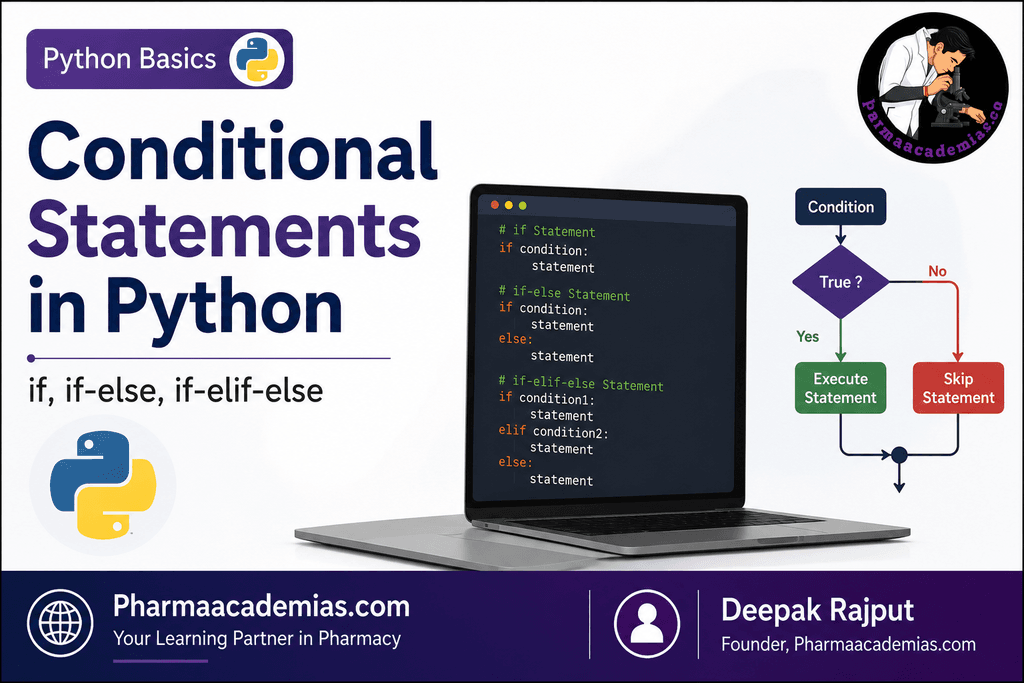
Conditional Statements in Python: Conditional statements are one of the most important concepts in Python programming. They allow a program to make decisions and execute different sets of instructions depending on whether a particular condition is True or False.
In real life, we make decisions based on conditions every day. For example:
- If it is raining, take an umbrella.
- If a student passes the examination, allow admission to the next class.
- If a patient’s temperature is high, provide appropriate medical attention.
- If the password is correct, allow the user to log in.
Similarly, a Python program can check a condition and decide what action should be performed.
1. Introduction to Conditional Statements in Python
A conditional statement is a programming statement that performs an action based on a specified condition.
In Python, conditions are generally expressions that produce one of two Boolean values:
- True
- False
For example:
age = 20
print(age >= 18)
Output:
True
Here, Python checks whether the value of age is greater than or equal to 18. Since 20 >= 18 is true, the result is True.
Conditional statements use such expressions to control the flow of a program.
The major conditional structures in Python are:
- if statement
- if-else statement
- if-elif-else statement
- Nested conditional statements
The first three are the basic and most commonly used forms.
2. Boolean Conditions in Python
Before understanding conditional statements, it is important to understand Boolean expressions.
A Boolean expression gives either:
True
or
False
For example:
x = 10
print(x > 5)
Output:
True
Some common comparison operators used in conditions are:
| Operator | Meaning | Example |
| == | Equal to | x == 10 |
| != | Not equal to | x != 10 |
| > | Greater than | x > 10 |
| < | Less than | x < 10 |
| >= | Greater than or equal to | x >= 10 |
| <= | Less than or equal to | x <= 10 |
These operators are frequently used with conditional statements.
For example:
marks = 75
if marks >= 50:
print(“Student has passed”)
Since 75 >= 50 is True, the message will be displayed.
3. The if Statement
The if statement is the simplest conditional statement in Python.
It is used when we want a particular block of code to execute only when a specified condition is true.
Syntax of if Statement
if condition:
statement
The general structure is:
If the condition is True:
Execute the code inside the if block
Otherwise:
Skip the code
The colon (:) after the condition is compulsory in Python.
Example 1: Checking Eligibility
age = 20
if age >= 18:
print(“You are eligible to vote”)
Output:
You are eligible to vote
Explanation
The condition is:
age >= 18
Since the value of age is 20, the condition becomes:
20 >= 18
This is True.
Therefore, Python executes:
print(“You are eligible to vote”)
Example 2: Condition is False
age = 16
if age >= 18:
print(“You are eligible to vote”)
Output:
No output
Here:
16 >= 18
is False.
Therefore, the statement inside the if block is skipped.
This is an important feature of the if statement: the code inside the block runs only when the condition is True.
4. Indentation in Python Conditional Statements
Python uses indentation to define blocks of code.
Indentation means leaving spaces before a line of code.
For example:
age = 20
if age >= 18:
print(“Eligible to vote”)
The print() statement is indented because it belongs to the if block.
Usually, Python programmers use four spaces for indentation.
Incorrect code:
age = 20
if age >= 18:
print(“Eligible to vote”)
This will produce an indentation error.
Correct code:
age = 20
if age >= 18:
print(“Eligible to vote”)
Indentation is very important in Python because it determines which statements belong to a particular condition.
5. Multiple Statements Inside an if Block
An if block can contain more than one statement.
Example:
marks = 80
if marks >= 50:
print(“Student has passed”)
print(“Congratulations!”)
print(“You are eligible for the next level”)
Output:
Student has passed
Congratulations!
You are eligible for the next level
All three statements are executed because they belong to the if block and the condition is true.
If the condition becomes false:
marks = 40
if marks >= 50:
print(“Student has passed”)
print(“Congratulations!”)
No output will be produced.
6. Using if in Pharmaceutical and Healthcare Examples
Conditional statements can be useful in pharmaceutical and healthcare-related programs.
For example, suppose we want to identify whether a patient’s body temperature indicates fever.
temperature = 38.5
if temperature > 37.5:
print(“The patient may have fever”)
Since the temperature is greater than 37.5, the message will be displayed.
Another example:
stock = 100
if stock < 20:
print(“Medicine stock is low”)
The warning will only appear when the stock becomes less than 20.
7. The if-else Statement
Sometimes, we want a program to perform one action when a condition is true and another action when the condition is false.
For this purpose, Python provides the if-else statement.
Syntax
if condition:
statement_1
else:
statement_2
The program works as follows:
Check the condition
If True:
Execute the if block
If False:
Execute the else block
The else block acts as an alternative when the if condition is not satisfied.
Example 1: Pass or Fail
marks = 45
if marks >= 50:
print(“Pass”)
else:
print(“Fail”)
Output:
Fail
Explanation
The condition is:
marks >= 50
Since:
45 >= 50
is false, Python skips the if block and executes the else block.
Example 2: Even or Odd Number
number = 10
if number % 2 == 0:
print(“Even number”)
else:
print(“Odd number”)
Output:
Even number
The % operator gives the remainder after division.
For example:
10 % 2
gives:
0
Therefore, the condition is true.
If we change the number:
number = 7
if number % 2 == 0:
print(“Even number”)
else:
print(“Odd number”)
Output:
Odd number
8. Example: Checking Positive or Negative Numbers
number = -5
if number >= 0:
print(“The number is positive”)
else:
print(“The number is negative”)
Output:
The number is negative
This program checks whether the number is greater than or equal to zero.
9. Example: Login System Using if-else
Conditional statements can be used to verify user information.
password = “python123”
if password == “python123”:
print(“Login successful”)
else:
print(“Incorrect password”)
Output:
Login successful
The == operator is used to compare two values.
A common mistake is to use:
password = “python123”
inside a condition.
The single equal sign (=) is used for assignment, whereas double equal signs (==) are used for comparison.
Correct:
if password == “python123”:
10. The if-elif-else Statement
Sometimes a program needs to check more than two conditions.
For example, a student’s result may be classified as:
- Distinction
- First Division
- Second Division
- Pass
- Fail
In such cases, using only if-else is not sufficient.
Python provides the elif keyword.
elif means:
else if
The if-elif-else structure allows a program to check multiple conditions one after another.
Syntax
if condition_1:
statement_1
elif condition_2:
statement_2
elif condition_3:
statement_3
else:
statement_4
Python checks the conditions from top to bottom.
- If the first condition is true, its block is executed.
- If the first condition is false, Python checks the next elif.
- This process continues until a true condition is found.
- If none of the conditions are true, the else block is executed.
11. Example: Student Grade Classification
marks = 85
if marks >= 90:
print(“Grade A+”)
elif marks >= 75:
print(“Grade A”)
elif marks >= 60:
print(“Grade B”)
elif marks >= 50:
print(“Grade C”)
else:
print(“Fail”)
Output:
Grade A
How Python evaluates this program
The value of marks is 85.
First condition:
marks >= 90
This is false.
Python then checks:
marks >= 75
This is true.
Therefore:
print(“Grade A”)
is executed.
After finding a true condition, Python does not check the remaining conditions in the same if-elif-else structure.
12. Importance of the Order of Conditions
The order of conditions is extremely important.
Consider this example:
marks = 85
if marks >= 50:
print(“Pass”)
elif marks >= 75:
print(“Grade A”)
elif marks >= 90:
print(“Grade A+”)
Output:
Pass
Although the student scored 85, Python checks the first condition:
marks >= 50
Since this is true, it immediately executes:
print(“Pass”)
The remaining conditions are not checked.
Therefore, the correct structure should place more specific or higher conditions first:
if marks >= 90:
print(“Grade A+”)
elif marks >= 75:
print(“Grade A”)
elif marks >= 50:
print(“Pass”)
else:
print(“Fail”)
This demonstrates why the sequence of conditions is important.
13. Example: Age Classification
age = 25
if age < 13:
print(“Child”)
elif age < 20:
print(“Teenager”)
elif age < 60:
print(“Adult”)
else:
print(“Senior Citizen”)
Output:
Adult
Python checks each condition in sequence.
Since:
25 < 13
is false, it moves to the next condition.
25 < 20
is also false.
Then:
25 < 60
is true.
Therefore, the program prints:
Adult
14. Pharmaceutical Example: Medicine Stock Status
Conditional statements can be used to classify medicine inventory.
stock = 15
if stock == 0:
print(“Medicine is out of stock”)
elif stock < 20:
print(“Low stock. Reorder medicine.”)
elif stock < 100:
print(“Stock is available”)
else:
print(“Stock level is sufficient”)
Output:
Low stock. Reorder medicine.
This type of program can be useful in pharmacy inventory management systems.
15. Example: Classification of Patient Temperature
temperature = 38.5
if temperature < 35:
print(“Low body temperature”)
elif temperature <= 37.5:
print(“Normal body temperature”)
elif temperature <= 39:
print(“Fever”)
else:
print(“High fever”)
The program checks the patient’s temperature and displays a message according to the specified range.
16. Using Logical Operators in Conditional Statements
Sometimes, more than one condition must be checked together.
Python provides logical operators such as:
- and
- or
- not
A. and Operator
The and operator returns true only when all conditions are true.
Example:
age = 25
has_id = True
if age >= 18 and has_id:
print(“Entry allowed”)
Both conditions are true:
age >= 18
and
has_id
Therefore, the message is displayed.
B. or Operator
The or operator returns true when at least one condition is true.
Example:
day = “Sunday”
if day == “Saturday” or day == “Sunday”:
print(“Weekend”)
Since the day is Sunday, the condition is true.
C. not Operator
The not operator reverses a Boolean value.
Example:
is_logged_in = False
if not is_logged_in:
print(“Please log in first”)
Since:
is_logged_in
is false, using not changes it to true.
Therefore, the message is printed.
17. Combining Multiple Conditions
Consider a student who must have both sufficient attendance and passing marks.
marks = 70
attendance = 80
if marks >= 50 and attendance >= 75:
print(“Student is eligible for the examination”)
else:
print(“Student is not eligible”)
The student must satisfy both conditions.
Another example:
qualification = “B.Pharm”
experience = 2
if qualification == “B.Pharm” or qualification == “M.Pharm”:
print(“Eligible qualification”)
else:
print(“Qualification not eligible”)
18. Nested if Statements
An if statement can also be placed inside another if statement. This is called a nested if statement.
Example:
age = 22
if age >= 18:
print(“Age requirement satisfied”)
if age >= 21:
print(“Additional age condition satisfied”)
Output:
Age requirement satisfied
Additional age condition satisfied
The second if statement is checked only after the first condition is true.
Example: Student Eligibility
marks = 65
attendance = 80
if marks >= 50:
if attendance >= 75:
print(“Student is eligible”)
else:
print(“Attendance is insufficient”)
else:
print(“Student has not passed”)
This program first checks marks. If the student has passed, it then checks attendance.
19. Difference Between if, if-else, and if-elif-else
| Statement | Purpose |
| if | Executes code only when a condition is true |
| if-else | Chooses between two possible actions |
| if-elif-else | Chooses between multiple possible conditions and actions |
if
if condition:
statement
Use it when an action should happen only if the condition is true.
if-else
if condition:
statement_1
else:
statement_2
Use it when there are exactly two alternatives.
if-elif-else
if condition_1:
statement_1
elif condition_2:
statement_2
else:
statement_3
Use it when multiple conditions need to be checked.
20. Flow of an if Statement
The logical flow can be understood as follows:
Start
|
v
Check Condition
|
+—- True —-> Execute if block
|
+—- False —-> Skip if block
|
v
Continue Program
21. Flow of an if-else Statement
Start
|
v
Check Condition
|
+—- True —-> Execute if block
|
+—- False —-> Execute else block
|
v
Continue Program
Only one of the two blocks is executed.
22. Flow of an if-elif-else Statement
Start
|
v
Check Condition 1
|
True ———-> Execute Block 1
|
False
|
v
Check Condition 2
|
True ———-> Execute Block 2
|
False
|
v
Check Condition 3
|
True ———-> Execute Block 3
|
False
|
v
Execute Else Block
Python evaluates conditions sequentially and executes the block associated with the first true condition.
23. Taking User Input with Conditional Statements
Conditional statements are commonly used with user input.
Example:
age = int(input(“Enter your age: “))
if age >= 18:
print(“You are eligible to vote”)
else:
print(“You are not eligible to vote”)
If the user enters:
20
The output will be:
You are eligible to vote
If the user enters:
15
The output will be:
You are not eligible to vote
The int() function is used to convert the entered value into an integer.
24. Example: Simple Result Evaluation Program
marks = float(input(“Enter your marks: “))
if marks < 0 or marks > 100:
print(“Invalid marks”)
elif marks >= 90:
print(“Excellent – Grade A+”)
elif marks >= 75:
print(“Very Good – Grade A”)
elif marks >= 60:
print(“Good – Grade B”)
elif marks >= 50:
print(“Pass – Grade C”)
else:
print(“Fail”)
This example demonstrates how several conditions can be combined to create a practical decision-making program.
25. Example: Pharmaceutical Dose Category
Conditional statements can also be used to classify values into different categories.
age = int(input(“Enter patient’s age: “))
if age < 12:
print(“Pediatric patient”)
elif age < 60:
print(“Adult patient”)
else:
print(“Geriatric patient”)
The program checks the age and categorizes the patient accordingly.
Note: In real clinical practice, medication dosing should not be determined by such a simplified program alone. Actual dosing requires appropriate clinical guidelines and professional judgment.
26. Common Errors in Conditional Statements
1. Forgetting the Colon
Incorrect:
if age >= 18
print(“Eligible”)
Correct:
if age >= 18:
print(“Eligible”)
The colon after the condition is required.
2. Incorrect Indentation
Incorrect:
if age >= 18:
print(“Eligible”)
Correct:
if age >= 18:
print(“Eligible”)
Python uses indentation to identify blocks of code.
3. Using = Instead of ==
Incorrect:
if marks = 50:
print(“Marks are 50”)
Correct:
if marks == 50:
print(“Marks are 50”)
Remember:
- = means assignment.
- == means comparison.
4. Incorrect Order of elif Conditions
Incorrect:
marks = 95
if marks >= 50:
print(“Pass”)
elif marks >= 75:
print(“Grade A”)
elif marks >= 90:
print(“Grade A+”)
The first condition is already true, so the later conditions will never be checked.
Correct:
if marks >= 90:
print(“Grade A+”)
elif marks >= 75:
print(“Grade A”)
elif marks >= 50:
print(“Pass”)
else:
print(“Fail”)
27. Truthy and Falsy Values in Python
Python does not always require a comparison operator in a condition.
Certain values are treated as True or False.
For example:
name = “Pharmaacademias”
if name:
print(“Name is available”)
Since the string is not empty, it is treated as True.
An empty string is treated as false:
name = “”
if name:
print(“Name is available”)
else:
print(“Name is empty”)
Some commonly considered false values are:
False
None
0
0.0
“”
[]
{}
()
Most other values are considered true.
Example:
medicine_list = []
if medicine_list:
print(“Medicines are available”)
else:
print(“Medicine list is empty”)
Since the list is empty, the else block is executed.
28. Practical Example: Pharmacy Inventory Decision Program
medicine = input(“Enter medicine name: “)
stock = int(input(“Enter available quantity: “))
if stock == 0:
print(medicine, “is out of stock”)
elif stock <= 10:
print(medicine, “has low stock. Reorder immediately.”)
elif stock <= 50:
print(medicine, “has moderate stock.”)
else:
print(medicine, “has sufficient stock.”)
This program takes information from the user and classifies the stock level.
29. Practical Example: Examination Result
name = input(“Enter student name: “)
marks = float(input(“Enter marks: “))
if marks < 0 or marks > 100:
print(“Invalid marks entered”)
elif marks >= 90:
print(name, “has secured Grade A+”)
elif marks >= 75:
print(name, “has secured Grade A”)
elif marks >= 60:
print(name, “has secured Grade B”)
elif marks >= 50:
print(name, “has passed with Grade C”)
else:
print(name, “has failed”)
This example demonstrates:
- User input
- Type conversion
- if
- Multiple elif statements
- else
- Logical operators
Key Points to Remember
- Conditional statements allow a Python program to make decisions.
- A condition usually evaluates to either True or False.
- The if statement executes code only when its condition is true.
- The else statement provides an alternative when the condition is false.
- The elif statement allows multiple conditions to be checked.
- Python checks if-elif-else conditions from top to bottom.
- Once Python finds a true condition, the remaining elif conditions are skipped.
- Proper indentation is essential in Python.
- A colon (:) is required after if, elif, and else.
- Comparison operators such as ==, >, <, >=, and <= are commonly used in conditions.
- Logical operators such as and, or, and not can combine or modify conditions.
- The order of conditions is important, especially when conditions overlap.
Conclusion
Conditional statements are fundamental tools for controlling the flow of a Python program. They enable programs to analyze information, make decisions, and perform different actions according to different situations.
The if statement is used when an action should occur only under a particular condition. The if-else statement is useful when a program must choose between two alternatives. The if-elif-else structure is used when several conditions or categories need to be evaluated.
By combining conditional statements with variables, comparison operators, logical operators, and user input, programmers can create interactive and intelligent programs. These concepts form the foundation for more advanced Python topics such as loops, functions, data processing, automation, and application development.
Editorial Note
This article has been carefully researched and written by Deepak Rajput with a focus on accuracy, clarity, and evidence-based healthcare information.