
HPR ID for Pharmacist: The digital transformation of healthcare is changing the way healthcare professionals are identified, registered, and connected with national health systems. Pharmacists are an important part of this transformation because they play a major role in medication management, patient counselling, dispensing, drug safety, and healthcare delivery. Pharmaacademias.com
To support this digital integration, the Pharmacy Council of India (PCI) is collaborating with the National Health Authority (NHA) to integrate the database of registered pharmacists across India into the Healthcare Professional Registry (HPR) under the Ayushman Bharat Digital Mission (ABDM). The official user manual describes the NHA-HPR DIGI-PHARMed Portal and explains the registration and profile-updating process for pharmacists.

This development is significant because pharmacists are now included in the Health Professional Registry along with other healthcare professionals such as nurses and dentists. The portal provides a structured digital mechanism through which pharmacists can register, verify their identity, submit professional information, and update their educational and employment-related details.
This blog provides a detailed, step-by-step explanation of the process described in the official user manual, including new pharmacist registration, Aadhaar verification, profile completion, document submission, State Pharmacy Council (SPC) verification, and the process for existing users.
What Is the NHA-HPR DIGI-PHARMed Portal?
The NHA-HPR DIGI-PHARMed Portal is a digital platform designed to facilitate the registration and integration of pharmacists into the Healthcare Professional Registry.
According to the user manual, the Pharmacy Council of India is working with the National Health Authority to integrate the database of registered pharmacists throughout India into the HPR under the Ayushman Bharat Digital Mission.
In simple terms, the initiative aims to create a structured digital representation of registered pharmacists so that professional information can be integrated into the broader digital healthcare ecosystem.
The manual explains that pharmacists are now considered part of the Health Professional Registry alongside other healthcare professionals.
Why Is This Registration Important for Pharmacists?
The registration process is important because it connects a pharmacist’s professional information with a centralized digital healthcare registry.
The process involves several important elements:
- Pharmacist registration
- State Pharmacy Council information
- Mobile number verification
- Registration number verification
- Aadhaar-based identity verification
- Educational information
- Professional and work information
- Supporting document submission
- State Pharmacy Council verification
The manual further explains that pharmacists can process the registration through both the NHA and DIGI-PHARMed websites. After registration, the pharmacist’s profile is shared with the respective registered State Pharmacy Council for verification.
Therefore, registration should not be viewed merely as creating an online account. It is part of a larger professional verification and digital onboarding process.
New Pharmacist Registration: Step-by-Step Guide
Step 1: Visit the DIGI-PHARMed Portal
For new registration, the user needs to visit:
https://digipharmed.pci.gov.in
The user manual specifically instructs pharmacists to visit the DIGI-PHARMed portal and select “Pharmacists Registration.”
This is the starting point of the new pharmacist registration process.
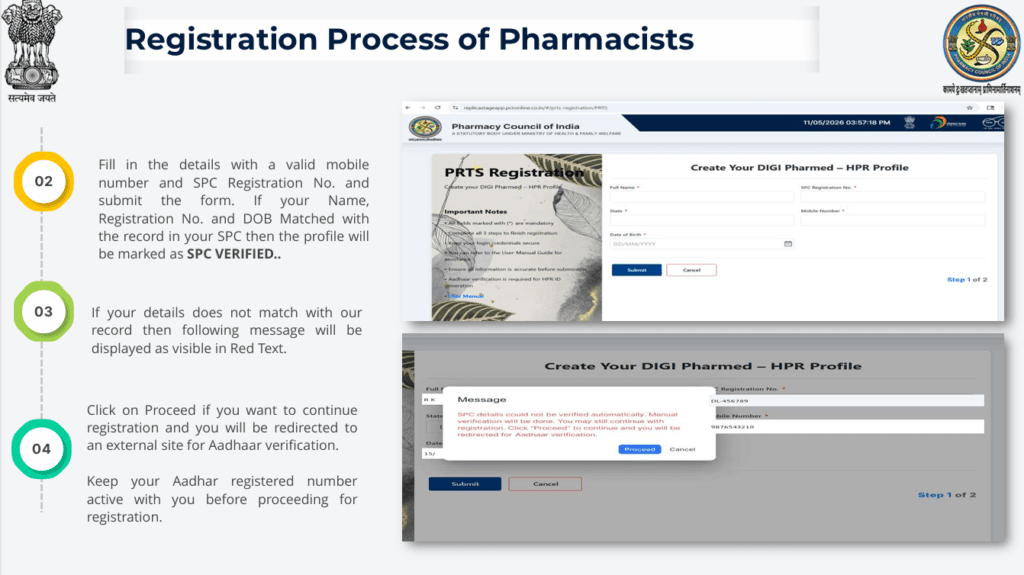
Step 2: Enter Mobile Number and State Pharmacy Council Registration Number
After selecting pharmacist registration, the applicant is required to provide:
- A valid mobile number
- State Pharmacy Council (SPC) Registration Number
The information entered is checked against the records available with the State Pharmacy Council.
This is an important stage because the registration information must correspond with the existing professional record.
Step 3: Matching of Name, Registration Number, and Date of Birth
The system checks whether the information provided by the pharmacist matches the records maintained by the State Pharmacy Council.
The manual states that if the following information matches the SPC record:
- Name
- Registration Number
- Date of Birth
the profile will be marked as “SPC VERIFIED.”
This verification step helps establish consistency between the pharmacist’s submitted information and the professional registration record.
What Happens If the Details Do Not Match?
If the information entered does not match the available State Pharmacy Council record, the portal displays a message in red text.
The manual indicates that the applicant can select “Proceed” if they want to continue the registration process. Selecting this option redirects the user to an external site for Aadhaar verification.
This means that a mismatch does not necessarily stop the registration process at this stage. Instead, the applicant can continue with the prescribed identity-verification process.
Step 4: Keep the Aadhaar-Registered Mobile Number Active
Aadhaar verification is an important component of the registration process.
The user manual specifically instructs applicants to keep their Aadhaar-registered mobile number active before proceeding with registration.
This is necessary because the subsequent Aadhaar verification process involves OTP-based authentication.
Therefore, before starting registration, pharmacists should ensure that:
- Their Aadhaar information is available.
- The mobile number linked with Aadhaar is active.
- They can receive OTP messages on that number.
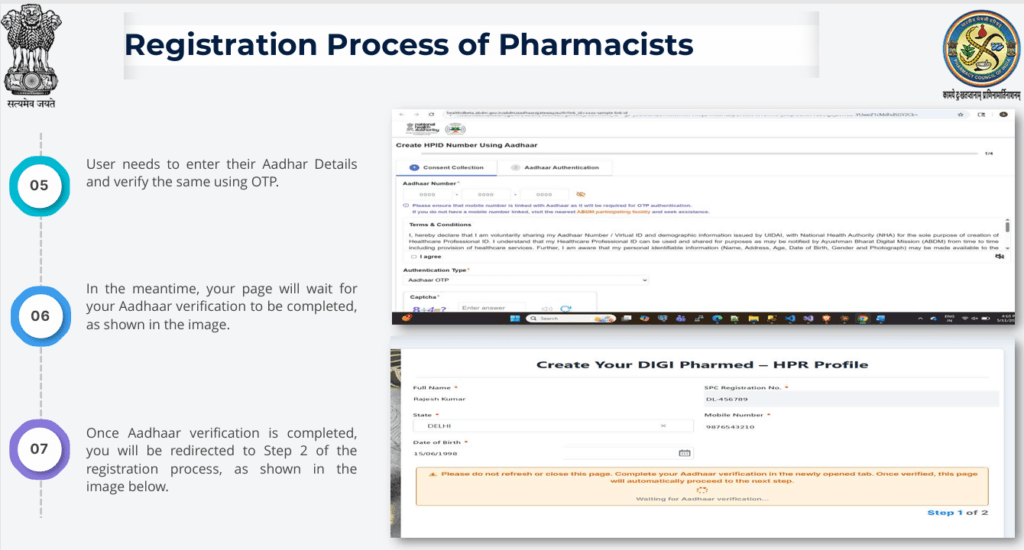
Step 5: Aadhaar Verification
After proceeding to Aadhaar verification, the applicant needs to enter their Aadhaar details and verify their identity using an OTP.
The manual explains that the registration page waits while Aadhaar verification is being completed.
Once the Aadhaar verification is successfully completed, the user is redirected to Step 2 of the registration process.
This stage therefore serves as an important identity-verification step before the applicant proceeds to complete the remaining registration information.
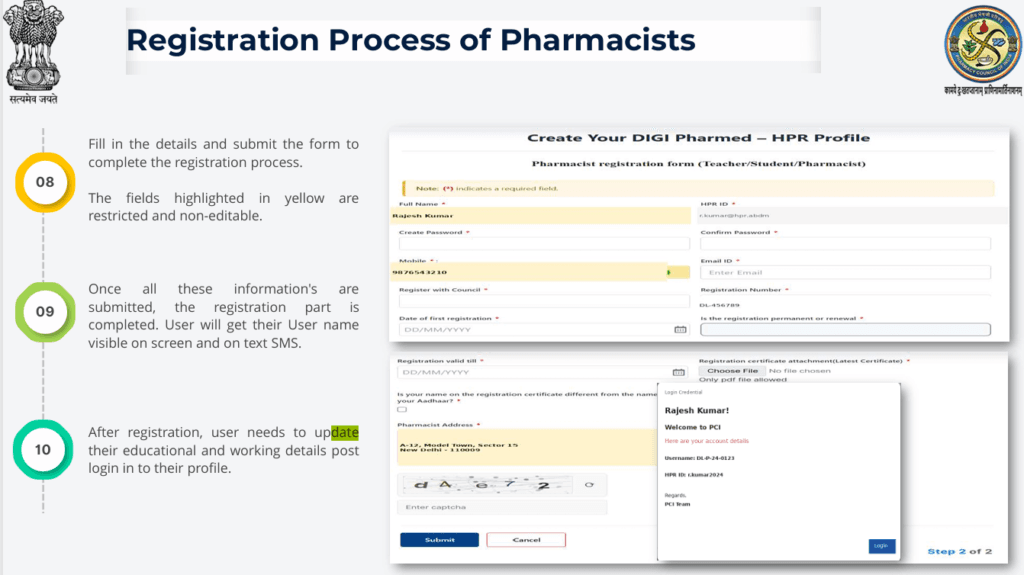
Step 6: Complete the Registration Form
After successful Aadhaar verification, the applicant must fill in the remaining required information and submit the form.
The user manual notes that certain fields highlighted in yellow are restricted and non-editable.
This distinction is important.
Not every field in the registration form can necessarily be changed manually. Some information has already been obtained through the registration and verification process and is therefore restricted.
Applicants should carefully review all editable information before submitting the form.
Step 7: Registration Completion and Username
Once all the required registration information has been submitted, the registration process is completed.
According to the manual, the user will receive a username displayed on the screen and through SMS.
The username should therefore be retained carefully because it will be needed for subsequent login.
However, registration is not the end of the process.
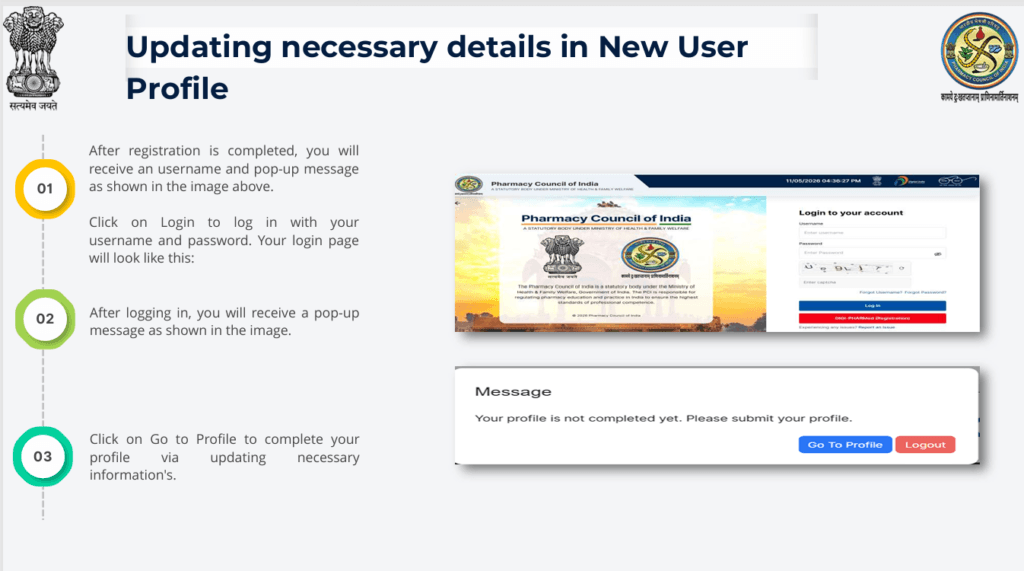
The manual clearly indicates that after registration, the pharmacist needs to log in and update their educational and working details.
Step 8: Login to the Pharmacist Profile
After registration, the pharmacist receives a username and can proceed to log in.
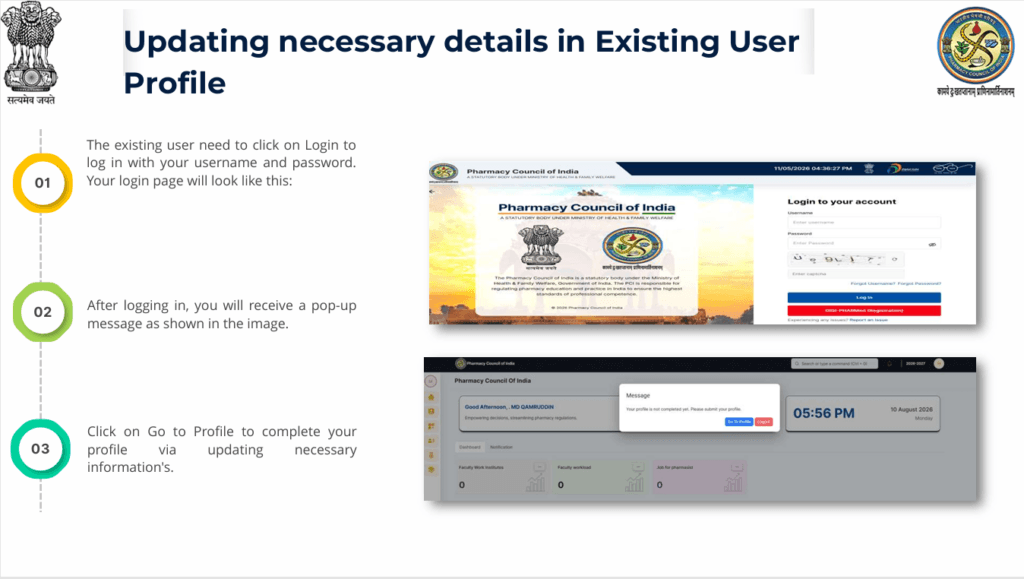
The user manual explains that the user should click “Login” and enter the username and password. After logging in, a pop-up message is displayed.
The pharmacist should then select “Go to Profile” to complete the remaining profile information.
Completing the Pharmacist Profile
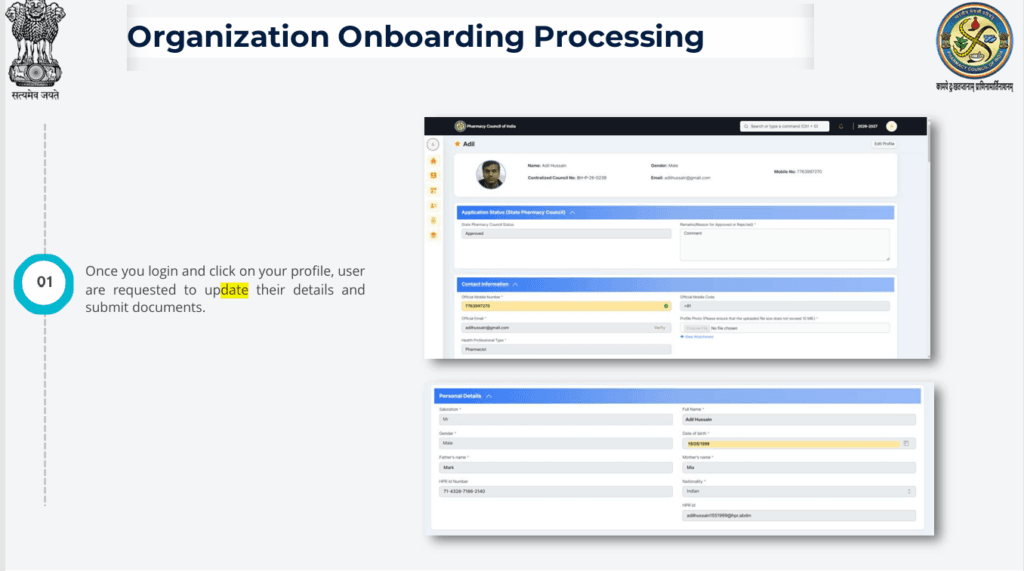
Registration creates the initial account, but the pharmacist must still complete the professional profile.
The profile-updating process involves providing necessary information and submitting supporting documents.
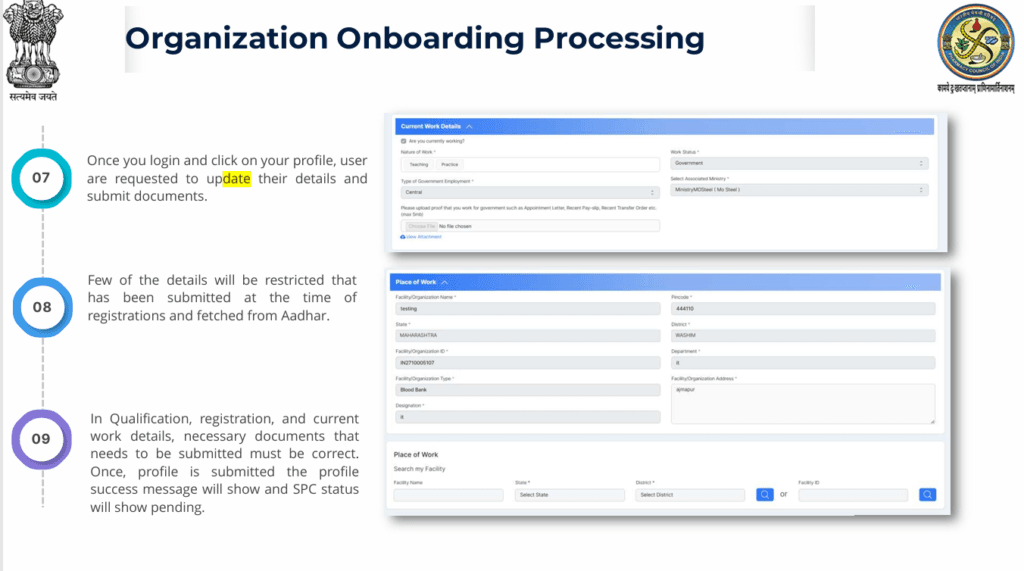
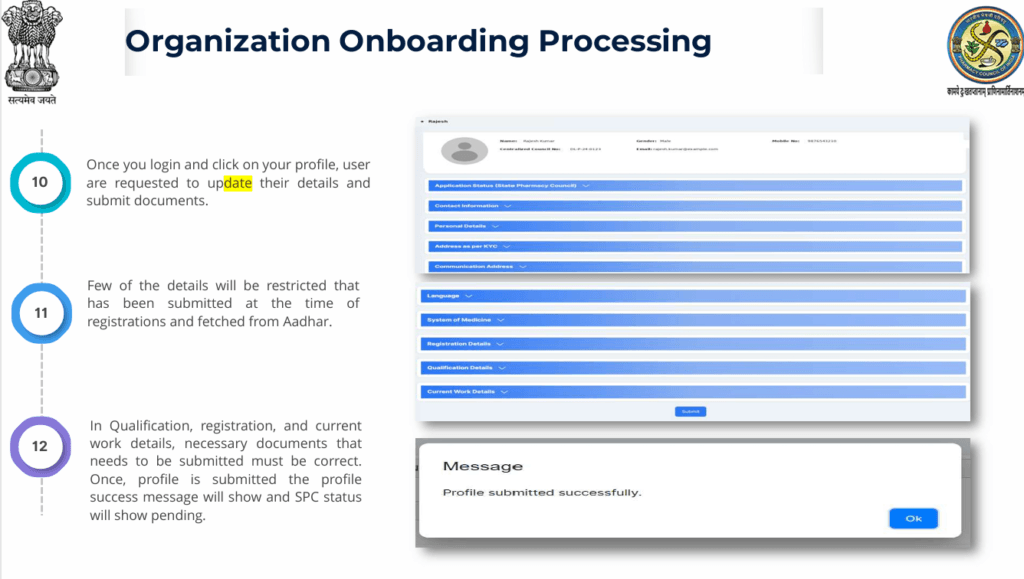
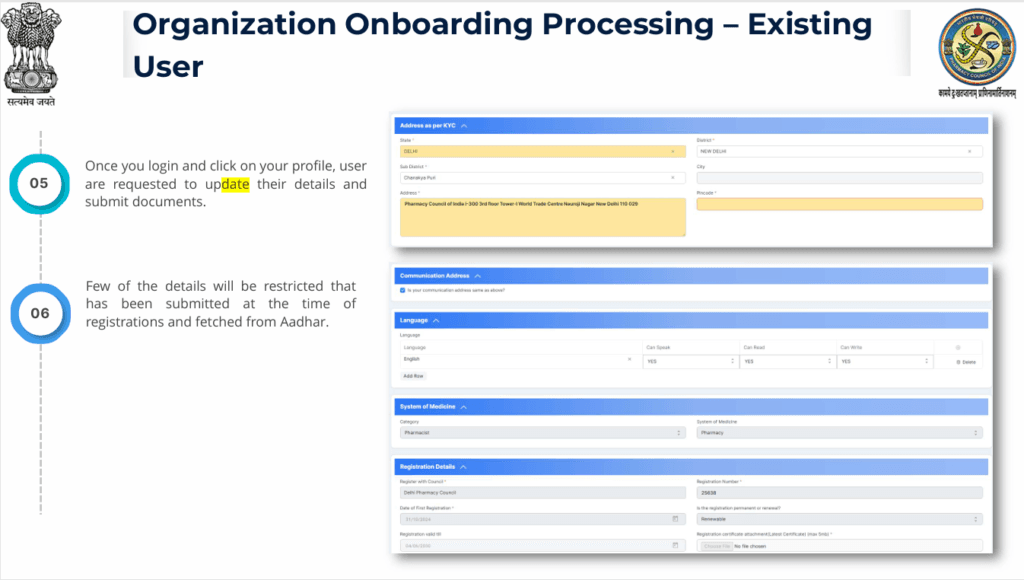
The manual explains that once the user logs in and accesses the profile, they are requested to update their details and submit documents.
This is particularly important because the professional profile contains information beyond the initial registration details.
Restricted Information in the Profile
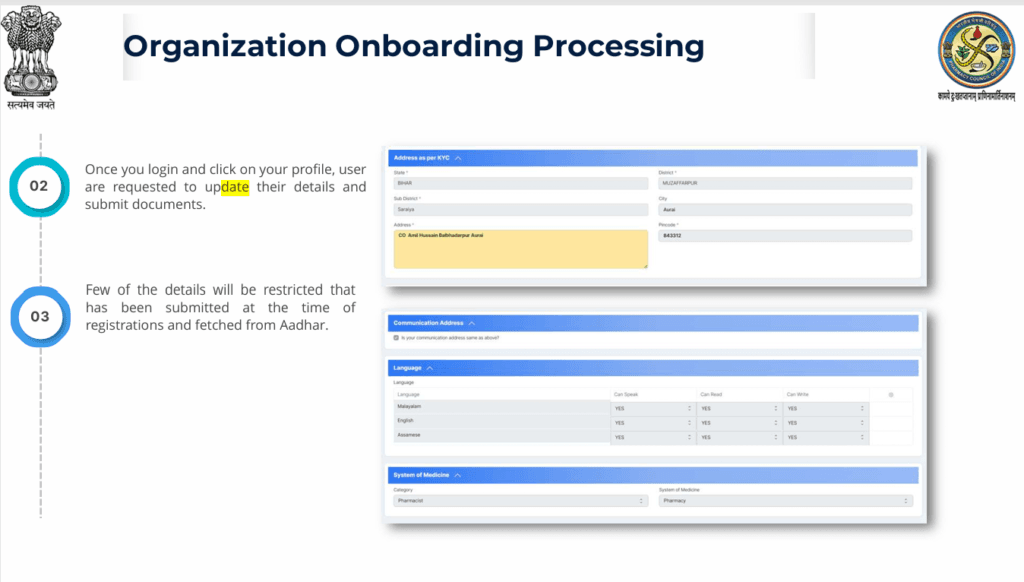
Some information displayed in the profile may not be editable.
According to the manual, certain details submitted during registration and information fetched from Aadhaar are restricted.
This means pharmacists should understand the difference between:
Editable information
Information that the user is allowed to update during profile completion.
Restricted information
Information that has already been submitted during registration or fetched through Aadhaar and cannot be freely modified.
Applicants should therefore carefully review their information before completing the initial registration and verification stages.
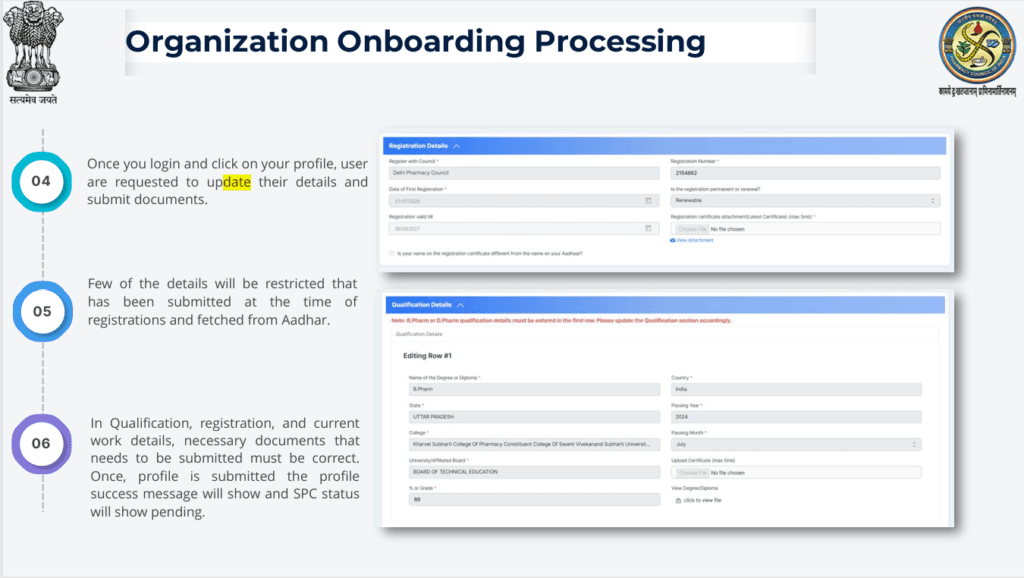
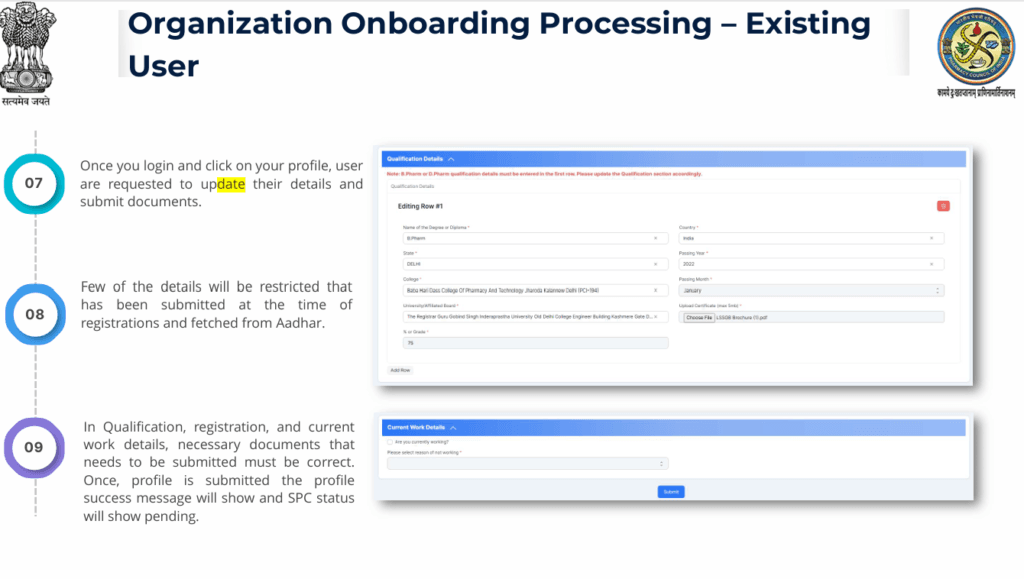
Qualification, Registration, and Current Work Details
One of the most important parts of the profile-completion process is the submission of professional information.
The manual specifically identifies three important categories:
- Qualification details
- Registration details
- Current work details
The documents associated with these details must be correct.
This is an important point for pharmacists because incorrect or incomplete professional information can affect the verification process.
Therefore, before submitting the profile, pharmacists should carefully check the information and supporting documents they are providing.
Document Submission: Why Accuracy Matters
The profile onboarding process requires document submission.
The user manual repeatedly emphasizes that the necessary documents associated with qualification, registration, and current work details should be correct.
Applicants should therefore avoid submitting inaccurate, incomplete, or inconsistent information.
The information entered in the profile should correspond with the supporting documents submitted through the portal.
Step 9: Submit the Completed Profile
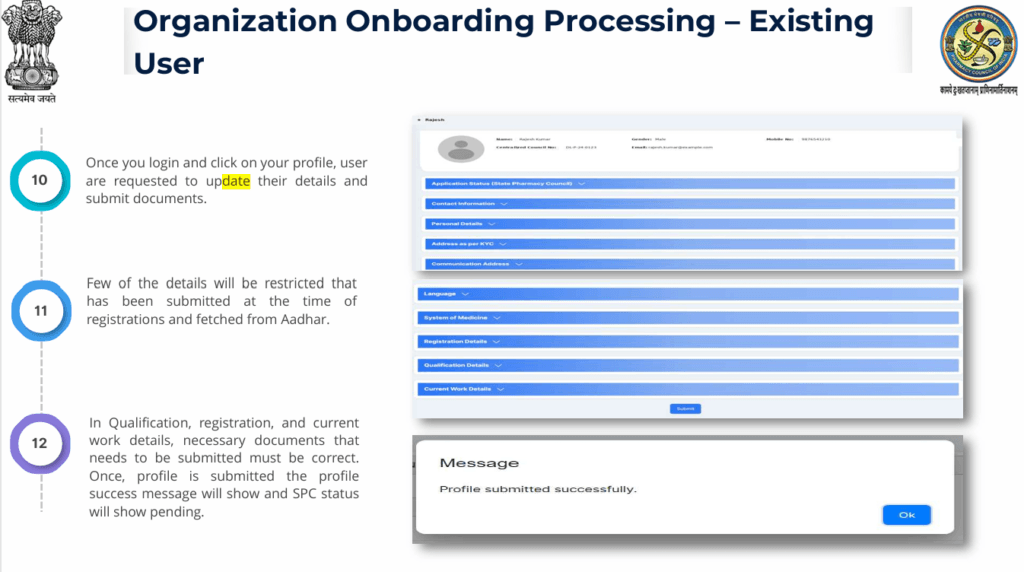
After completing the required information and uploading the necessary documents, the pharmacist can submit the profile.
The manual states that once the profile is submitted successfully, a success message is displayed. At this stage, the SPC status will show as “Pending.”
The “Pending” status indicates that the profile has moved forward in the process but State Pharmacy Council verification is still pending.
Understanding the SPC Status
The State Pharmacy Council plays an important role in the verification process.
During the initial registration stage, if the pharmacist’s name, registration number, and date of birth match the SPC record, the profile can be marked SPC VERIFIED.
However, after profile submission, the manual states that the SPC status can display as Pending.
Therefore, pharmacists should not necessarily interpret a “Pending” status immediately after submission as an error. It indicates that the profile is awaiting the relevant verification process.
Existing User Profile Updating Process
The portal also provides a process for pharmacists who are already existing users.
The manual contains a separate section titled “Updating necessary details in Existing User Profile.”
Existing users do not follow exactly the same initial registration process as new users.
Instead, they need to log in using their existing username and password.
Step 1 for Existing Users: Login
Existing users should click “Login” and enter their existing username and password.
After logging in, the system displays a pop-up message. The user should then select “Go to Profile” to update the necessary information.
This allows existing users to complete or update their professional profile without starting the entire new-user registration process again.
Step 2 for Existing Users: Update Profile Information
After accessing the profile, existing users are requested to update their information and submit the required documents.
The manual describes this process as Organization Onboarding Processing – Existing User.
As with new users, some information may be restricted because it was previously submitted during registration or obtained through Aadhaar.
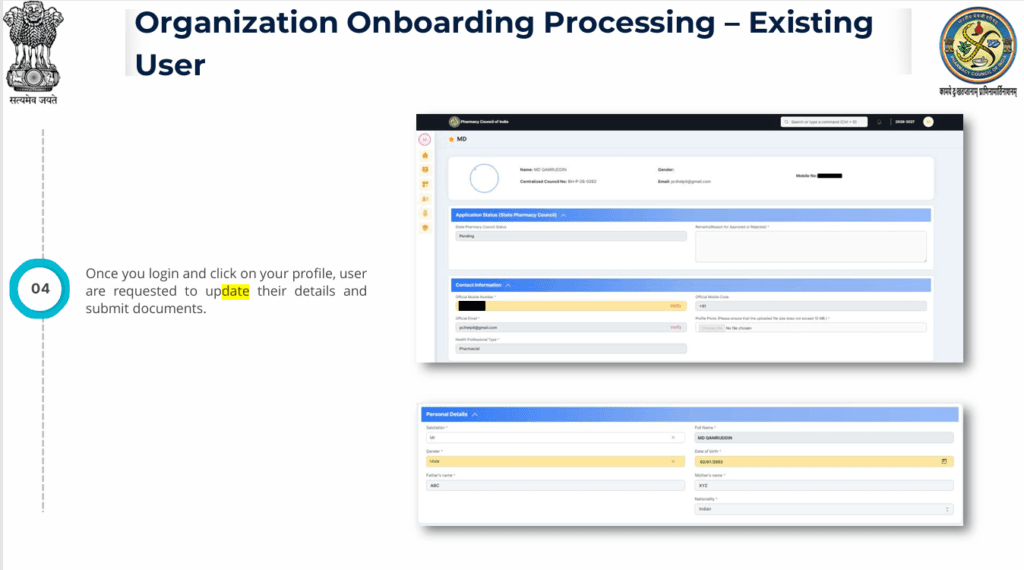
Therefore, existing users should focus on the fields that are available for updating.
Step 3 for Existing Users: Verify Professional Information
Existing users should ensure that their:
- Qualification information
- Pharmacy registration information
- Current work information
- Supporting documents
are correct.
The manual specifically emphasizes that the necessary documents submitted for qualification, registration, and current work details must be correct.
Step 4 for Existing Users: Submit the Profile
After updating the required information and documents, the existing user can submit the profile.
Once submitted successfully, the system displays a success message, while the SPC status is shown as Pending.
The same general principle applies to the existing-user workflow: successful submission is followed by the relevant State Pharmacy Council verification process.
New User vs Existing User
The portal essentially provides two pathways for pharmacists.
| Feature | New User | Existing User |
|---|---|---|
| Initial registration | Required | Already completed |
| Mobile number and SPC registration details | Entered during registration | Existing account used |
| Aadhaar verification | Part of new registration process | Depends on existing account/profile status |
| Username | Generated after registration | Existing username |
| Profile completion | Required | Required/updated |
| Educational details | Updated after registration | Updated where required |
| Work details | Updated after registration | Updated where required |
| Supporting documents | Submitted | Submitted/updated |
| SPC status | Verification process | Verification process |
The distinction is important because a pharmacist who already has an account should generally use the existing-user login pathway rather than unnecessarily attempting to create another account.
Important Information Pharmacists Should Keep Ready
Although the exact document list should be determined from the portal’s current requirements, the user manual makes it clear that pharmacists need to provide accurate information and documents relating to their:
1. Qualification
Information and supporting documents relating to professional educational qualifications.
2. Pharmacy Registration
Information associated with the pharmacist’s registration with the State Pharmacy Council.
3. Current Work Details
Information relating to current professional/work status and the necessary supporting documentation.
The manual explicitly emphasizes correctness of these details and their documents.
Common Points to Remember During Registration
Keep Your Aadhaar-Registered Mobile Number Active
Because Aadhaar verification uses OTP authentication, applicants should have access to the mobile number registered with Aadhaar.
Check Your SPC Information Carefully
Name, registration number, and date of birth are used to match the applicant with the State Pharmacy Council record.
Do Not Assume Every Field Can Be Edited
Some fields are restricted and non-editable.
Keep Professional Documents Accurate
The manual specifically emphasizes correctness of documents related to qualification, registration, and current work details.
Save Your Username
The username is displayed on screen and sent through SMS after registration.
Complete the Profile After Registration
Creating the account does not complete the entire process. Educational and work information must subsequently be updated.
Do Not Be Concerned Immediately by a Pending SPC Status
After profile submission, the manual indicates that the SPC status will show as Pending while the relevant verification process is pending.
A Simple Step-by-Step Flow
The overall process can be understood as follows:
Visit DIGI-PHARMed Portal
↓
Select Pharmacists Registration
↓
Enter Mobile Number + SPC Registration Number
↓
SPC Information Matching
↓
Aadhaar Verification
↓
OTP Verification
↓
Complete Registration Form
↓
Receive Username
↓
Login
↓
Go to Profile
↓
Update Qualification Details
↓
Update Registration Details
↓
Update Current Work Details
↓
Upload Required Documents
↓
Submit Profile
↓
Success Message
↓
SPC Status: Pending
↓
State Pharmacy Council Verification
This flow summarizes the sequence described in the user manual for new pharmacist registration and subsequent profile onboarding.
Frequently Asked Questions
1. Who is the DIGI-PHARMed portal intended for?
The user manual describes the portal in the context of pharmacist registration and integration of registered pharmacists into the Healthcare Professional Registry.
2. Where should a new pharmacist start the registration?
The manual directs users to the DIGI-PHARMed website and instructs them to click “Pharmacists Registration.”
3. What information is required initially?
The manual specifies a valid mobile number and State Pharmacy Council Registration Number.
4. What information is checked against the SPC record?
The manual identifies the applicant’s name, registration number, and date of birth as matching information.
5. What happens if the details do not match?
A red warning/message is displayed, and the user can choose to proceed with Aadhaar verification if they wish to continue registration.
6. Is Aadhaar verification required?
The described registration workflow includes Aadhaar-based verification using Aadhaar details and OTP.
7. Can every field be edited?
No. The manual states that certain fields highlighted in yellow are restricted and non-editable.
8. What happens after initial registration?
The pharmacist receives a username and then needs to log in and update educational and working details.
9. What professional information needs supporting documents?
The manual specifically highlights qualification, registration, and current work details.
10. What does “SPC Pending” mean after submission?
The manual states that after successful profile submission, the success message is displayed and SPC status shows Pending.
11. What should an existing user do?
Existing users should log in with their username and password, select “Go to Profile,” and update the necessary information and documents.
Final Takeaway
The NHA-HPR DIGI-PHARMed Portal represents an important step toward integrating pharmacists into India’s digital healthcare infrastructure. The initiative is being implemented through collaboration between the Pharmacy Council of India and the National Health Authority, with pharmacist information being integrated into the Healthcare Professional Registry under the Ayushman Bharat Digital Mission.
For a new pharmacist, the process begins with registration using a mobile number and State Pharmacy Council registration number, followed by verification of professional details and Aadhaar-based OTP verification. After completing the registration form, the pharmacist receives a username and must subsequently log in to complete their professional profile.
The profile-completion stage is equally important. Pharmacists need to provide accurate qualification, registration, and current work information and submit the necessary supporting documents. Once the profile is successfully submitted, the SPC status is shown as pending while the verification process proceeds.
Existing users follow a separate pathway: they log in using their existing credentials, access their profile, update the required information, submit supporting documents, and complete the onboarding process.
Overall, pharmacists should approach the process carefully, verify that their professional information is accurate, keep their Aadhaar-registered mobile number accessible for OTP verification, retain their login credentials, and ensure that all submitted qualification, registration, and employment-related documents are correct.
Source: Pharmacy Council of India, NHA-HPR DIGI-PHARMed Portal – User Manual for Pharmacists Registration Process.