
Modular Programs for Simple Pharmaceutical Applications: A modular program is a program divided into smaller, independent sections called modules or functions. Each module performs a specific task. Instead of writing one large program, we can divide the program into smaller functions that can be developed, tested, and reused separately.
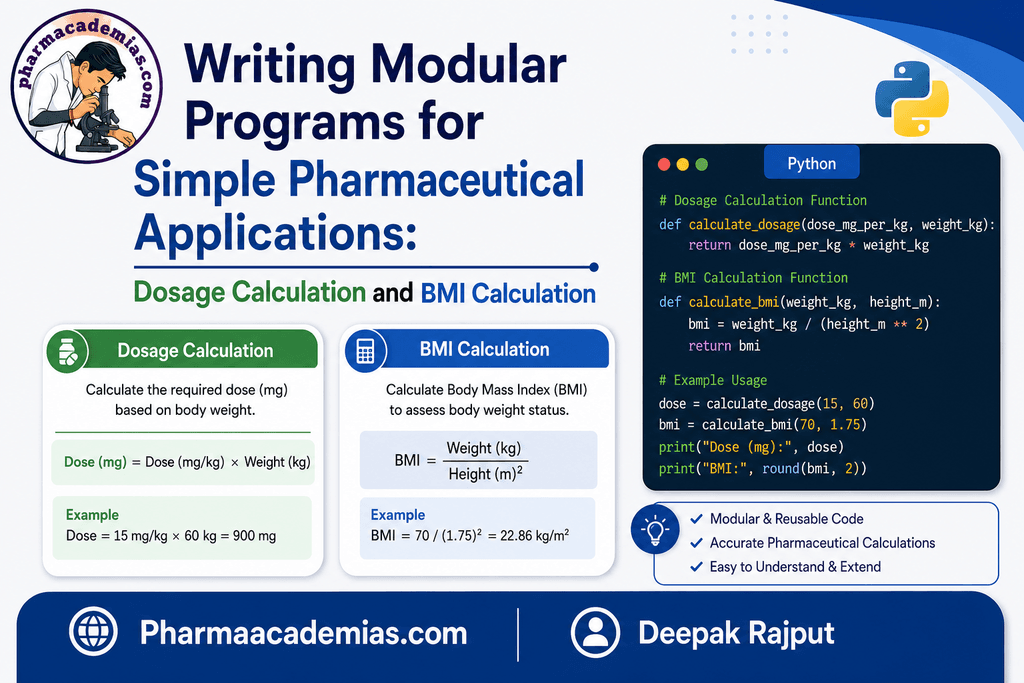
In Python, functions are commonly used to create modular programs.
For pharmacy students, modular programming is useful because pharmaceutical calculations often involve repeated operations. Examples include:
- Dosage calculation
- BMI calculation
- Drug concentration calculation
- Dilution calculations
- Percentage yield
- Dose conversion
- Laboratory data analysis
This note demonstrates modular programming using two simple applications: dosage calculation and BMI calculation.
1. Advantages of Modular Programming
Modular programming provides several benefits.
1. Reusability: A function can be used multiple times without rewriting the same calculation.
2. Easy Debugging: If an error occurs, we can identify which function contains the problem.
3. Better Organization: Large programs can be divided into smaller and understandable sections.
4. Easy Maintenance: Individual functions can be modified without changing the entire program.
5. Improved Readability: A well-designed program is easier for students and researchers to understand.
6. Testing: Each function can be tested independently before combining it with other functions.
2. Structure of a Modular Pharmaceutical Program
A simple modular program can be organized into three major sections:
Input
↓
Processing
↓
Output
For example:
Patient information
↓
Calculation function
↓
Calculated result
In Python, we can implement each calculation as a separate function.
3. Application 1: Dosage Calculation
Dosage calculation is an important concept in pharmacy and healthcare. For programming practice, we can create a simple function that calculates a dose based on body weight and a specified dose value per kilogram.
The basic relationship is:
Dose = Body Weight × Dose per kg
For example, if:
- Body weight = 60 kg
- Dose = 5 mg/kg
Then:
Dose = 60 × 5 = 300 mg
Educational note: This is a programming example, not a recommendation for actual medication dosing. Real medication doses depend on the drug, indication, patient factors, formulation, clinical guidelines, and healthcare-professional judgment.
4. Creating a Dosage Calculation Function
def calculate_dose(weight, dose_per_kg):
dose = weight * dose_per_kg
return dose
Here:
- calculate_dose() is the function.
- weight is the patient’s body weight.
- dose_per_kg is the specified dose per kilogram.
- dose stores the calculated value.
- return sends the result back to the program.
5. Calling the Dosage Function
weight = 60
dose_per_kg = 5
dose = calculate_dose(weight, dose_per_kg)
print(“Calculated dose:”, dose, “mg”)
Output
Calculated dose: 300 mg
The function can also be reused for another calculation:
dose1 = calculate_dose(50, 4)
dose2 = calculate_dose(70, 3)
print(“Dose 1:”, dose1, “mg”)
print(“Dose 2:”, dose2, “mg”)
Output
Dose 1: 200 mg
Dose 2: 210 mg
6. Taking Input from the User
A more interactive program can ask the user to enter the required values.
def calculate_dose(weight, dose_per_kg):
return weight * dose_per_kg
weight = float(input(“Enter body weight in kg: “))
dose_per_kg = float(input(“Enter dose per kg: “))
dose = calculate_dose(weight, dose_per_kg)
print(“Calculated dose:”, dose, “mg”)
Example
Enter body weight in kg: 60
Enter dose per kg: 5
Calculated dose: 300.0 mg
The use of float() allows the program to accept decimal values.
7. Application 2: BMI Calculation
BMI (Body Mass Index) is a numerical measure calculated from body weight and height.
The formula is:
BMI = Weight (kg) / Height² (m²)
For example:
- Weight = 70 kg
- Height = 1.75 m
Therefore:
BMI = 70 / (1.75 × 1.75)
BMI ≈ 22.86 kg/m²
BMI is a screening measure and should not be interpreted as a complete assessment of an individual’s health status.
8. Creating a BMI Function
We can create a separate function for BMI calculation.
def calculate_bmi(weight, height):
bmi = weight / (height ** 2)
return bmi
Here:
- weight represents body weight in kilograms.
- height represents height in metres.
- ** 2 means raising the height to the power of 2.
- return bmi returns the calculated BMI.
9. Calling the BMI Function
weight = 70
height = 1.75
bmi = calculate_bmi(weight, height)
print(“BMI:”, bmi)
Output
BMI: 22.857142857142858
The result can be rounded using the round() function.
print(“BMI:”, round(bmi, 2))
Output
BMI: 22.86
10. Adding BMI Classification
We can create another function to classify the BMI value.
def classify_bmi(bmi):
if bmi < 18.5:
return “Underweight”
elif bmi < 25:
return “Normal range”
elif bmi < 30:
return “Overweight”
else:
return “Obesity”
This separates the calculation from the classification, making the program more modular.
For general adult BMI screening, these commonly used categories are:
| BMI (kg/m²) | Category |
| Below 18.5 | Underweight |
| 18.5–24.9 | Normal range |
| 25.0–29.9 | Overweight |
| 30.0 or above | Obesity |
These categories are general adult screening categories and may not be appropriate for every population or clinical situation.
11. Complete Modular BMI Program
def calculate_bmi(weight, height):
return weight / (height ** 2)
def classify_bmi(bmi):
if bmi < 18.5:
return “Underweight”
elif bmi < 25:
return “Normal range”
elif bmi < 30:
return “Overweight”
else:
return “Obesity”
weight = float(input(“Enter weight in kg: “))
height = float(input(“Enter height in metres: “))
bmi = calculate_bmi(weight, height)
category = classify_bmi(bmi)
print(“BMI:”, round(bmi, 2))
print(“Category:”, category)
Example Output
Enter weight in kg: 70
Enter height in metres: 1.75
BMI: 22.86
Category: Normal range
12. Combining Dosage and BMI Calculations
We can create a single modular program containing separate functions for both applications.
def calculate_dose(weight, dose_per_kg):
return weight * dose_per_kg
def calculate_bmi(weight, height):
return weight / (height ** 2)
def classify_bmi(bmi):
if bmi < 18.5:
return “Underweight”
elif bmi < 25:
return “Normal range”
elif bmi < 30:
return “Overweight”
else:
return “Obesity”
# Patient information
weight = float(input(“Enter body weight in kg: “))
height = float(input(“Enter height in metres: “))
# Dosage calculation
dose_per_kg = float(input(“Enter dose per kg: “))
dose = calculate_dose(weight, dose_per_kg)
# BMI calculation
bmi = calculate_bmi(weight, height)
category = classify_bmi(bmi)
# Results
print(“\n— Results —“)
print(“Calculated dose:”, round(dose, 2), “mg”)
print(“BMI:”, round(bmi, 2))
print(“BMI category:”, category)
Example Output
Enter body weight in kg: 70
Enter height in metres: 1.75
Enter dose per kg: 5
— Results —
Calculated dose: 350.0 mg
BMI: 22.86
BMI category: Normal range
13. Understanding the Modular Structure
The program is divided into three separate functions:
calculate_dose()
↓
Calculates dose
calculate_bmi()
↓
Calculates BMI
classify_bmi()
↓
Determines BMI category
This makes the program easier to understand and modify.
For example, if we want to change the BMI classification system, we only need to modify the classify_bmi() function.
14. Why Modular Programming is Useful in Pharmaceutical Applications
Pharmaceutical calculations often involve multiple steps. Modular programming allows each step to be represented by a separate function.
For example:
Patient Data
↓
Input Function
↓
Calculation Function
↓
Validation Function
↓
Result
The same approach can be extended to:
- Dose calculations
- Creatinine clearance calculations
- Drug concentration calculations
- Dilution calculations
- Percentage yield
- Molarity calculations
- Normality calculations
- Unit conversions
- Pharmacokinetic calculations
- Experimental data processing
- Statistical analysis
15. Important Programming Concepts Demonstrated
The dosage and BMI programs demonstrate several fundamental Python concepts:
def
Used to define a function.
def calculate_bmi(weight, height):
Parameters
Variables that receive information inside a function.
weight, height
Arguments
Actual values supplied when calling the function.
calculate_bmi(70, 1.75)
return
Sends the calculated result back to the calling program.
return bmi
input()
Allows the user to enter data.
weight = float(input(“Enter weight: “))
if, elif, and else
Used to make decisions.
if bmi < 18.5:
…
elif bmi < 25:
…
else:
…
16. Key Advantages of the Example
The modular program has several advantages:
- Simple: Each function performs one specific task.
- Reusable: Functions can be called repeatedly.
- Readable: The purpose of each function is clear.
- Maintainable: Individual functions can be modified independently.
- Testable: Each calculation can be tested separately.
- Expandable: Additional pharmaceutical calculations can easily be added.
17. Practice Questions for Pharmacy Students
Basic Questions
- What is a modular program?
- What is a function in Python?
- What is the purpose of the def keyword?
- What is the difference between a parameter and an argument?
- What is the purpose of the return statement?
Programming Exercises
- Write a Python function to calculate BMI.
- Write a function to calculate dose based on body weight.
- Write a function to calculate drug concentration.
- Write a function to calculate percentage yield.
- Create a modular program containing separate functions for BMI and dosage calculation.
- Modify the BMI program so that it accepts user input.
- Add input validation so that negative weight or height values are rejected.
Conclusion
Modular programming is an important approach to developing clear, reusable, and maintainable Python programs. By dividing a program into separate functions, each function can perform a specific task.
In pharmaceutical applications, modular programming can be used to develop simple tools for dosage calculations, BMI calculations, drug concentration, dilution, laboratory calculations, and research data analysis.
The key principle is:
Divide → Define Functions → Pass Data → Calculate → Return Results → Display Output
Learning modular programming gives pharmacy students a strong foundation for developing more advanced Python applications in pharmaceutical research, clinical data analysis, pharmacology, pharmaceutics, and healthcare data processing.
Editorial Note
This article has been carefully researched and written by Deepak Rajput with a focus on accuracy, clarity, and evidence-based healthcare information.